
Customer hub & inbox
Keep the client relationship together.
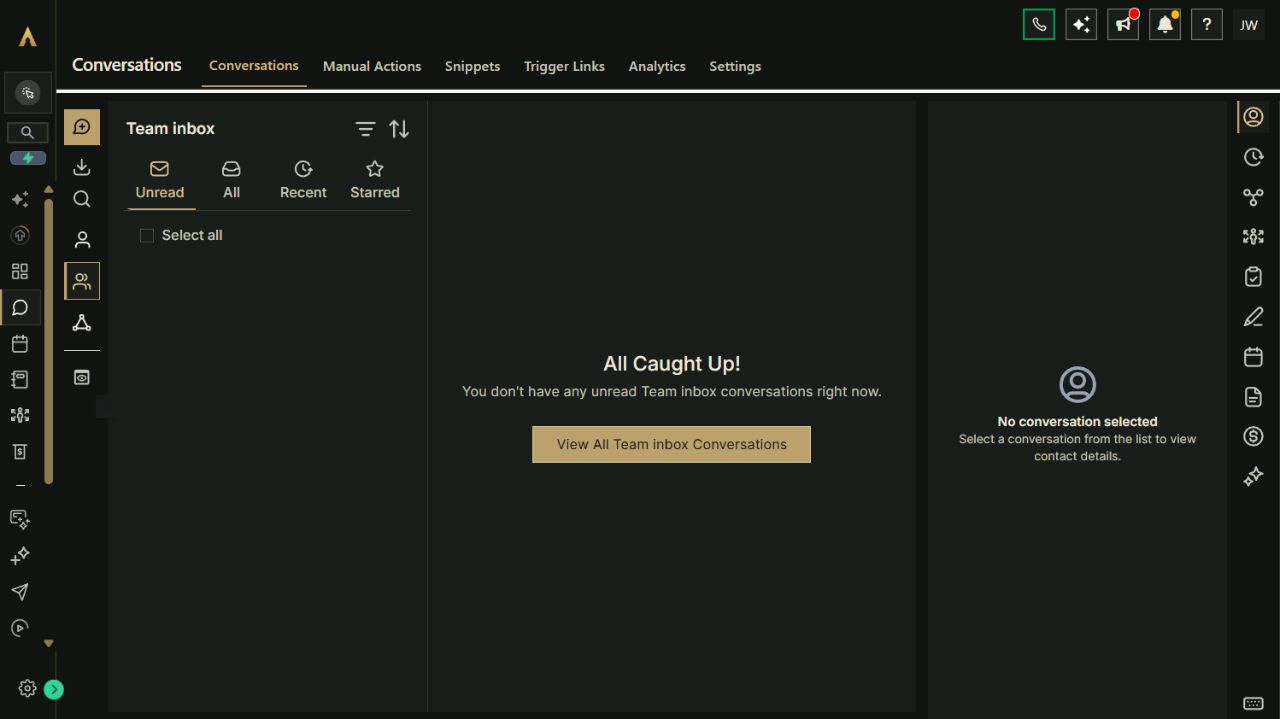
Organize customer details, supported conversations, inquiry stages and tasks. Keep business communication in context without assuming the workspace is a health or workout-tracking record.
 ARCHON.TOOLSARCHON DIGITAL LLC
Archon.tools · Navigation
Archon Personal Training
One workspace for client relationships, sessions, campaigns and your training resources. Keep your specialist coaching tools connected.
FREE 30 days. Nexus Executive with four recommended tools. Card required; then $197/month unless canceled. Usage, paid extras and tax are separate. Need just one tool? Start with Archon Starter at $97/month.
Starting this business? Build your launch plan with Archon Foundry
The connected platform
Bring client conversations, sessions, campaigns and learning resources into one platform. Replace overlapping business tools around your training practice, keep specialist fitness apps you need, and expand through marketplace apps and integrations.
Customer hub & inbox
Organize customer details, supported conversations, inquiry stages and tasks. Keep business communication in context without assuming the workspace is a health or workout-tracking record.
Booking & calendars
Offer appointment types around your availability and supported calendars. Prepare the meeting details and reminders for the session experience you choose.
Follow-up & campaigns
Plan your own social content, permission-based program announcements and relevant client follow-up. Choose audience, content, timing and stop conditions.
Courses & communities
Organize your lessons, preparation material and community spaces with member access you control. The platform hosts your content; you provide the training expertise and moderation.
Room to expand
Choose a different four, or open all seven categories with Apex.
Website & forms
Build service and program pages using your own copy, portfolio and inquiry forms. Keep claims accurate and link to the consultation experience you have tested.
Reviews & retention
Request feedback consistently and manage supported review destinations. Use only testimonials and images you have permission to publish, without promising fitness results.
Reporting
Compare supported inquiries, bookings and campaign activity. Business reports are separate from workout metrics, body measurements and specialist health data.
Training practice / client rhythm
Bring the conversation, session plan and your own learning resources into a clear business rhythm. You provide the coaching and professional judgment; Workspace keeps the customer-side details connected.
 PRACTICE / 01
A week shaped around the work
Illustrative client rhythm, configured around your service and schedule.
The prospect's business conversation, appointment and agreed follow-up stay connected while you assess fit.
Your client can find the agreed learning material and prepare for sessions without another disconnected content tool.
Relevant content and client communication support your ongoing training engagement.
Choose a useful starting point
Explore the customer and booking tools, then shape the experience around your own practice.
Start your FREE 30-day Workspace trialSee the platform at work
Your website, customer records, campaigns, bookings and other selected tools belong to one connected platform. Keep the specialist software you rely on and expand through the App Marketplace.
Explore the full workspace previewActual Archon demo workspace. These screens are product examples, not customer results. Tools and connected channels depend on your plan and configuration.
Put it to work
Connect your tools around the work you do. Choose a setup guide to adapt and test in your workspace.
Paste the brief into Archie’s text chat or your own assistant to work through the setup. You choose what to enable.
Paste the brief into Archie’s text chat or your own assistant to work through the setup. You choose what to enable.
Paste the brief into Archie’s text chat or your own assistant to work through the setup. You choose what to enable.
Your platform. Your ecosystem.
Bring common business work into Archon.tools and connect the specialist apps you still need. Each option below has its own scope and setup requirements.
Extend the setup
Choose the connections that fit your business. Confirm account eligibility, the data to connect and any third-party costs before setup.
 Microsoft Outlook / Microsoft 365
Keep supported one-to-one Outlook / Microsoft 365 customer email in context and coordinate bookings with your cloud calendar. Connect email and calendar separately.
Email and calendar connect separately. Automated campaigns use the Workspace email provider; on-premises Exchange calendars are not supported. Supported connection. Availability and permissions depend on your account. Microsoft Teams
Add Teams meeting links to eligible consultations and online appointments. Connect a work or school Teams account separately from Outlook.
Requires a work or school Teams account; connect separately from Outlook. Supported connection. Availability and permissions depend on your account. Instagram
Plan visual training content and handle supported messages.
An eligible professional account and the required Meta permissions are needed. Supported connection. Availability and permissions depend on your account. Facebook
Connect supported client conversations and community updates.
Page permissions required. Social publishing and reviews can also be configured. Supported connection. Availability and permissions depend on your account. TikTok
Plan supported short-form fitness content and eligible lead connections.
Publishing and lead-ad connections have separate account requirements. Supported connection. Availability and permissions depend on your account. Google Calendar
Arrange consultations and sessions against connected calendars.
Calendar permissions and linked/conflict-calendar settings must be confirmed. Supported connection. Availability and permissions depend on your account. Zoom
Add meeting links to eligible remote coaching sessions.
Connect each host's account; automatic links depend on calendar type. Supported connection. Availability and permissions depend on your account. Stripe
Assess eligible checkout for a training or course offer.
Checkout is separately configured and tested; processing fees and account eligibility apply. Separate setup. Availability and permissions depend on your account. Google Drive
Access owned training resources while preparing client content.
Shared files and shared-file shortcuts are not supported; ownership matters. Supported connection. Availability and permissions depend on your account.Built-in connection
Connect the calendars your appointment hosts use and choose which busy times should block availability.
Built-in connection
Add a meeting link to eligible remote consultations and sessions through your connected calendar setup.
Built-in connection
Keep supported social inquiries beside customer records as you discuss the training services you provide.
Built-in connection
Use your own payment processor for eligible booking, payment-link or course purchases when the experience is ready.
Make it yours
Use our written guides for the tools on your plan. Archie, our AI chat assistant, answers questions while you explore.
Set availability, connect the right calendar and test the appointment and notification experience.
Prepare lessons and access settings, then preview the learner experience before sharing it.
Choose the audience and trigger, prepare messages and stop rules, and test the sequence.
A considered fit
Consultations, sessions, client resources and marketing can work together here. Gym dues, class packs and credits, check-in, facility access and complex class-capacity rules need specialist systems or a separate fit review.
You supply the training, content and advice. The workspace does not diagnose, prescribe or guarantee physical results. Sensitive health records, detailed workout tracking and regulated services need an appropriate specialist setting.
The suggested four categories are customer hub, booking, campaigns, and courses and communities. Website, reputation and reporting are additional choices or part of the full suite. AI, sending, paid apps and processing are separate costs.
A recommendation, not a restriction
Start with Nexus Executive and the four categories recommended for personal trainers & fitness coaches. You can choose a different combination on the main plan selector.
Nexus Executive: $197/month after the trial. Card required; renews automatically unless canceled. Cancel from your account and retain access through the end of the period. Prices exclude applicable tax. Usage and paid extras are separate. Setup is self-service with written guides; there is no setup fee.
Optional AI tools
Start with the Workspace FREE 30-day trial above. These AI add-ons are optional, separately billed, and follow their own terms.
Optional for this business
Help prospective clients understand your training options, then draft campaign updates about sessions and programs for your review.
AI add-ons: $78/month total. Workspace and applicable tax are separate. The total includes one $20 monthly AI usage allowance shared across these tools; no automatic extra usage charges are billed. Phone numbers and carrier costs are separate where applicable.
AI add-ons are separate from the FREE trial. After your trial starts, add them from your account; it shows current availability and the full price before you buy.
Archon Digital / Custom work
Need a custom website, integration or workflow around your business? Archon Digital offers design and engineering work with an agreed scope, separately from your workspace subscription.
Before you start
Yes. Compare the business tools you want to consolidate and keep specialist fitness tracking where you need it. Confirm any supported connection before relying on shared data; an available marketplace listing is not proof that every exercise or client metric will sync.
The starting focus is your personal-training business: client conversations, appointments, marketing and access to your own resources. Courses and communities do not establish class-credit accounting, facility entry or gym dues. Those requirements need a separate review.
You provide your own training programs, lessons and professional guidance. Optional AI assistants are separate services with reviewed sources, supported channels and usage costs; they are not automatically included in the workspace trial or a substitute for your professional judgment.