
Connect the apps you use.
Bring supported email, calendars, stores, social accounts and other services into your workspace.
Explore connection examples ARCHON.TOOLSARCHON DIGITAL LLC
Archon.tools · Navigation
App Marketplace
Bring the specialist apps you rely on together with your connected Archon.tools workspace. Keep what works, extend what you can do, and explore compatible connections for your own AI assistant.
The workspace is your hub
Bring more of your business together without replacing every specialist tool. Start with what your workspace already does, then extend it where it matters.
Bring supported email, calendars, stores, social accounts and other services into your workspace.
Explore connection examplesBrowse the App Marketplace inside your workspace for apps, workflow actions and tools from independent developers.
See how to add an appExplore custom integrations or the official Archon API and MCP limited read-only beta for eligible workspaces and compatible clients.
Explore API & MCPFind the connection
A curated selection of documented connections. Explore the full App Marketplace in your workspace.
30 connection examples
Explore / Review / Connect in your workspace GmailSupported connection
Keep supported customer email threads alongside contact records.
One-to-one email sync; bulk campaigns and unknown senders follow different rules.
 Microsoft OutlookSupported connection
Connect customer email and your team's calendar.
Email and calendar connections are set up separately; sync rules vary.
 FacebookSupported connection
Bring Page messages and lead-ad inquiries into your customer hub.
Page permissions required. Social publishing and reviews can also be configured.
 InstagramSupported connection
Follow up on supported business messages and social inquiries.
An eligible professional account and the required Meta permissions are needed.
 WhatsAppPaid add-on
Give customers another familiar way to reach your business.
Optional subscription and messaging usage; business verification and template rules apply.
 Google CalendarSupported connection
Sync appointments and check connected calendars for busy times.
Calendar permissions and linked/conflict-calendar settings must be confirmed.
 Apple iCloudSupported connection
Connect an existing iCloud calendar to your scheduling setup.
Apple account requirements and supported sync behavior are confirmed during setup.
 CalendlySupported connection
Import Calendly bookings and their guest details.
Calendar import is one-way; cancellations and reschedules need separate handling.
 ZoomSupported connection
Give customers an online meeting link with eligible bookings.
Connect each host's account; automatic links depend on calendar type.
 Google MeetSupported connection
Meet customers online through your Google scheduling setup.
Meeting links depend on the connected user and supported calendar type.
 Microsoft TeamsSupported connection
Create meeting links for eligible customer appointments.
Requires a work or school Teams account; connect separately from Outlook.
 ShopifySupported connection
Use supported store and order activity for customer follow-up.
Keep your existing store; imported records and workflow scope are agreed first.
 WooCommerceSupported connection
Bring contacts, orders and transactions from your existing store.
A compatible store connection is required; building or migrating a store is separate.
 StripeSeparate setup
Offer payments through eligible forms, bookings or course experiences.
Checkout is separately configured and tested; processing fees and account eligibility apply.
 PayPalSeparate setup
Add a familiar payment option to supported checkout experiences.
Product-area and recurring-payment support vary; setup and processing costs are separate.
 SquareSeparate setup
Use Square for eligible online payment experiences.
Payment features vary by product; separate checkout setup and processing costs apply.
 QuickBooksSupported connection
Connect customer records and supported invoices or sales receipts.
Sync direction varies by record. Existing and newly created invoices behave differently.
 Google Business ProfileSupported connection
Bring Google reviews into your reputation workflow.
Requires the appropriate access to your business profile; supported publishing can also be configured.
 Google AdsSupported connection
Review connected advertising results alongside your business measures.
Ad-account access and correct tracking are required; ad spend and management are separate.
 Google AnalyticsSupported connection
See GA4 traffic and engagement in supported dashboards and reports.
Requires a connected GA4 property, data stream and reporting permissions.
 LinkedInSupported connection
Plan and schedule social posts.
Account and post-type requirements vary.
 TikTokSupported connection
Plan social content and connect supported lead ads.
Publishing and lead-ad connections have separate account requirements.
 YouTubeSupported connection
Plan and schedule video publishing.
Channel and supported video-format requirements apply.
 PinterestSupported connection
Plan and schedule Pins.
Account and post-type requirements vary.
 ThreadsSupported connection
Plan and schedule social posts.
Account and post-type requirements vary.
 BlueskySupported connection
Plan and schedule social posts.
Account and post-type requirements vary.
 Google DriveSupported connection
Access owned files in the media library for your content.
Shared files and shared-file shortcuts are not supported; ownership matters.
 SlackUsage charges
Send workflow notifications to the right team member or channel.
Premium workflow actions must be enabled; execution charges apply.
 Google SheetsUsage charges
Create, find and update spreadsheet rows from agreed workflows.
Premium workflow actions must be enabled; execution charges apply.
 ZapierThird-party automation
Connect additional apps through a separately designed automation.
Your Zapier plan and supported triggers/actions set the limits; we confirm the connection during setup.
Available features depend on the app, your selected workspace tools and account permissions. Connections require your authorization and setup. Existing app subscriptions, optional add-ons and usage charges can be separate.
Inside your workspace
Your workspace’s App Marketplace lets you browse categories, compare app details and find tools that fit how you work.
Open your workspace and select App Marketplace in the menu. Search by app or category to explore what fits your business.
Open your workspace Read the setup guide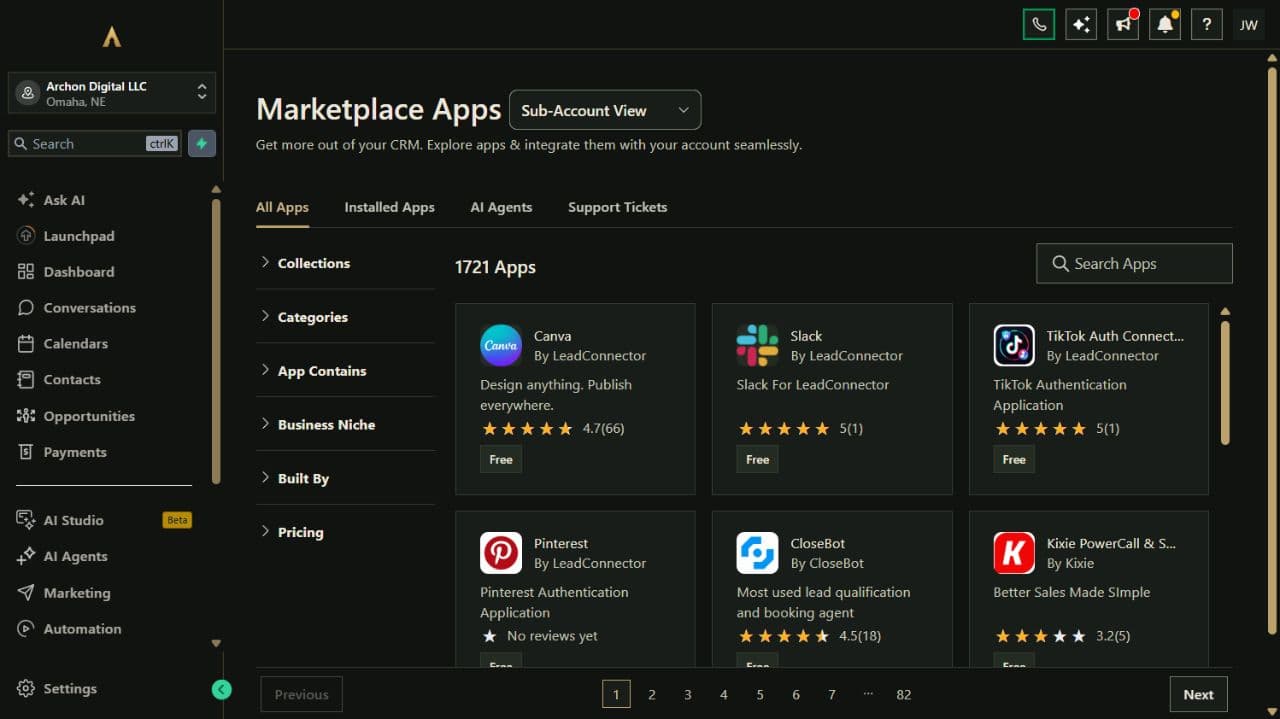
A connection that earns its place
The useful connection is the one that does the job you need, with the right access and costs.
Your chosen tool categories determine your workspace access. Connecting an app does not add other tool categories to your plan. Some connections need a paid add-on or separately priced service.
No. Review the supported features, sign in to your own app account and authorize the requested access. Installations and external connections are configured in your workspace. Test a small example before depending on a connection.
No. Each app has its own supported actions, sync direction, account requirements, permissions and pricing. A listing is not a promise that every record or feature will sync.
Custom integrations and automation are scoped separately. The official Archon API and MCP beta currently support limited workspace and setup-guide reads for eligible, approved workspaces; they do not grant general access to customer records or administrative actions.
Read the API & MCP scopeArchon.tools + Archon Link
Start with your workspace. Add the connections that make it yours.